


Uppgraderingsguide för VW Digital Cluster: 12,3-tums eftermontering i OEM-stil för Golf, Passat och Tiguan
VW Digital Cluster uppgraderingsguide: 12.3" OEM-stil eftermontering för Golf, Passat och Tiguan
A Uppgradering av VW digitalt kluster är en av de mest synliga interiöruppgraderingarna för Volkswagen- och Audi-ägare som vill ha en modern 12.3-tums digital instrumentpanel istället för traditionella analoga mätare. Den här guiden förklarar passningskontroller, kärnfunktioner, installationsbegränsningar, CANBUS-integration, firmware-stöd och de viktigaste riskerna att bekräfta innan du beställer.
Den iKAGOO 12.3-tums digitala instrumentpanelen använder en högupplöst 1920×720-display och ett Linux-baserat system som är utformat för stabil instrumentpaneldrift. För de flesta stödda fordon är eftermonteringen utformad som en icke-destruktiv uppgradering utan kabelkapning och utan borrning. Slutlig kompatibilitet beror fortfarande på fordonsplattform, originalinstrumentets typ, instrumentpanelens ram, rattknappar och regional konfiguration.
Kompatibilitetschecklista: Är ditt fordon redo?
Detta Uppgradering av VW digitalt kluster är huvudsakligen utformad för utvalda Volkswagen- och Audi-plattformar. Passformen måste bekräftas före köp eftersom instrumentpanelens form, kablar och klusterarkitektur kan variera beroende på årsmodell, region och utrustningsnivå.
- Fordonsplattform: Används vanligen för utvalda MQB- och PQ-plattformsfordon, inklusive Golf, Passat, Tiguan och relaterade Audi-modeller.
- Instrumentpanelens ram: Den fysiska clusterramen måste matcha ersättningsenheten.
- Original clustertyp: Fordon med analoga cluster och befintliga digitala cluster kan behöva olika bekräftelse.
- Rattreglage: Knapptyp och styrlogik bör kontrolleras innan beställning.
- Original varningsdata: Beteendet för ABS, airbag, TPMS, bränsle och andra data beror på fordonsplattform och CANBUS-rutt.
Automotive-display och Linux-system
Ett digitalt instrumentkluster måste vara stabilt eftersom det visar körinformation, varningar och fordonsstatus. iKAGOO-enheten använder ett Linux-baserat gränssnitt snarare än ett allmänt Android-underhållningssystem, vilket hjälper klustret att fokusera på instrumentpanelens display, fordonsdata och snabbt startbeteende.
| Metrik | Specifikationsdetaljer |
|---|---|
| Displaystorlek | 12.3-tums digital instrumentklusterdisplay |
| Upplösning | 1920×720 HD-display |
| Operativsystem | Linux-baserat instrumentpanelssystem |
| Fordonsdata | CANBUS-baserad dataintegrering, beroende på fordonsplattform |
| Installationstyp | Icke-destruktiv eftermontering för stödda fordon |
| Modifiering | Normalt krävs ingen kabelkapning eller borrning |
| Stöd | Fjärrguide och firmware-stöd när så är tillämpligt |
Installationsöversikt: Icke-destruktiv eftermontering
Installation av en Uppgradering av VW digitalt kluster bör behandlas som en eftermontering av fordonselektronik, inte som ett enkelt byte av inredningsdetaljer. För kompatibla fordon är installationen normalt reversibel och kräver inte att man kapar fabrikens kablage. Installationstiden och inställningskraven beror dock på fordonsmodell, installatörens erfarenhet och instrumentbrädans skick.
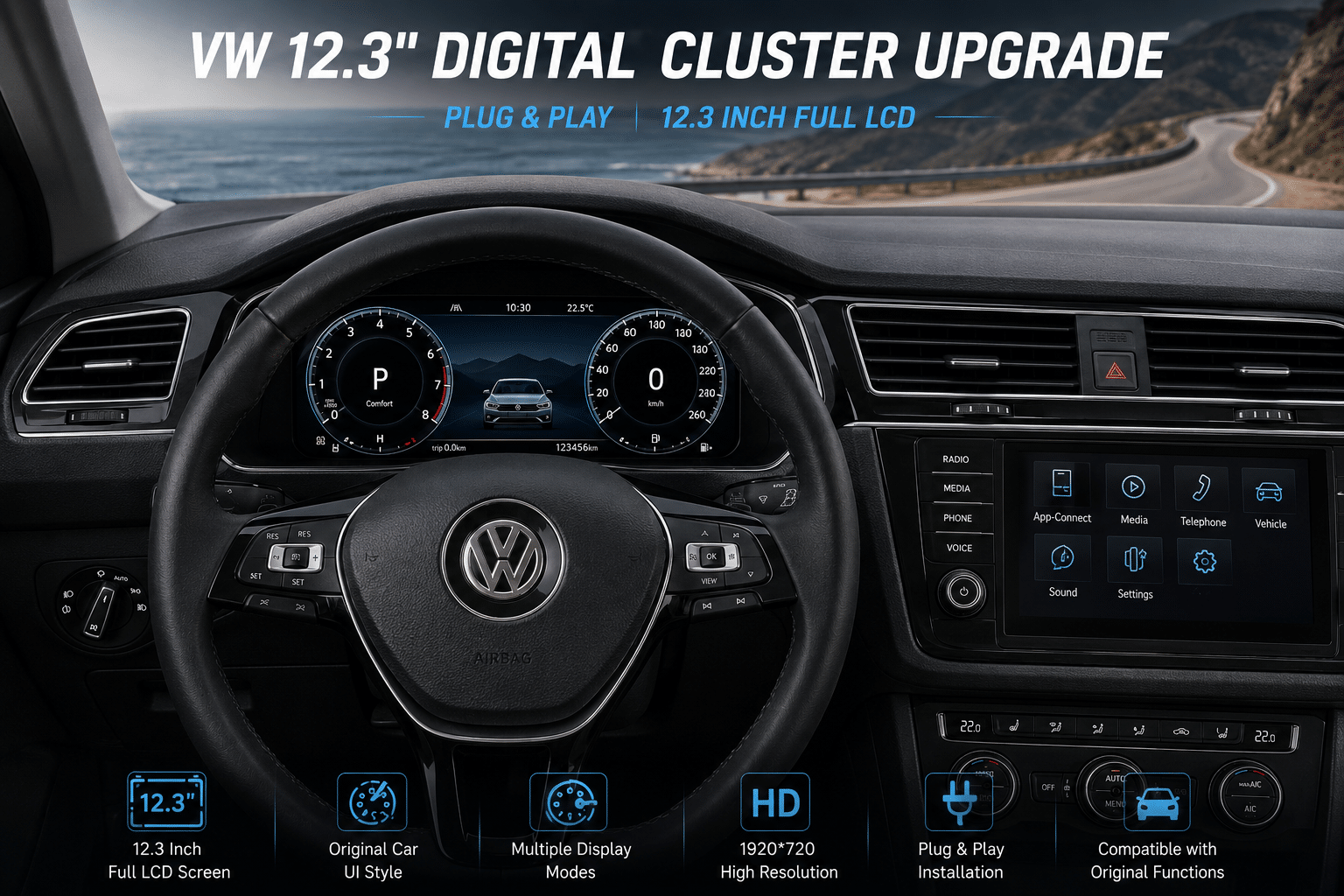
Se VW 12.3 Digital Cluster installerad effekt
Denna referens visar hur VW:s digitala cluster-uppgradering ser ut efter installation i en Volkswagen-instrumentbräda. Innan du beställer, bekräfta din instrumentbrädas ram, ursprunglig clustertyp, fordonsår och kontaktväg så att iKAGOO kan förbereda rätt version.
- 12.3-tums digital instrumentklusterdisplay
- OEM-liknande instrumentbrädesposition för kompatibla VW-modeller
- CANBUS-baserad fordonsdatalintegration där det stöds
- Normalt krävs ingen kabelkapning eller borrning
Säkerhet och statiskt skydd
Innan du rör elektroniska komponenter, ladda ur kroppsstatisk elektricitet genom att röra ett jordat metallföremål. Håll kort och kontakter i kanterna. Dra inte i kablage genom att dra i ledningarna, och tvinga inte en kontakt som inte passar.
CANBUS-integrering och kärnfunktioner
En ordentlig Uppgradering av VW digitalt kluster bör hålla instrumentpanelen användbar, läsbar och väl anpassad till fordonet. Funktioner som stöds beror på den exakta fordonsplattformen och konfigurationen.
- Rattreglage: Meny- och temahantering kan stödjas via fabriksknappar, beroende på knapptyp.
- Visning av fordonsvarningar: ABS, airbag, bränsle, TPMS och andra varningar beror på CANBUS-integrering och fordonskonfiguration.
- Visning av körsträcka: Körsträckans beteende beror på fordonsplattformen och den ursprungliga datavägen för instrumentklustret.
- Temalternativ: Flera digitala instrumentpanelstilar kan finnas tillgängliga beroende på programvaruversion.
- Navigations- eller speglingsrutt: Vissa konfigurationer kan stödja visning av karta eller mobilinnehåll, beroende på ansluten head unit och klusterversion.
Vanliga problem och tekniska kontroller
- Problem: Felindikator efter installation.
Kontrollera: Bekräfta original summer- eller högtalarhantering, kontaktdonets passform och CANBUS-kontaktanslutning. - Problem: Skärmen förblir svart vid start.
Kontrollera: Verifiera strömkabelanslutningen, tändningsläget och om rätt klusterversion levererades. - Problem: Fel enheter eller språk.
Kontrollera: Använd inställningsmenyn för att växla km/h, mph, språk och visningspreferenser där det stöds. - Problem: Rattknapparna kan inte styra menyerna.
Kontrollera: Bekräfta knapptyp, CANBUS-inställning och fordonsplattformsstöd med iKAGOO-support.
Varför välja iKAGOO för en digitalklusteruppgradering för VW?
iKAGOO fokuserar på OEM-stil bilelektronikuppgraderingar för Volkswagen- och Audi-fordon. För en retrofittning av digitalt instrumentkluster är de viktigaste punkterna inte bara skärmstorlek och utseende, utan också monteringsbekräftelse, CANBUS-kompatibilitet, installationssupport och säker hantering av firmware efter köpet.
Innan du beställer, skicka din bilmodell, årsmodell, foto på instrumentbrädan och foto på originalklustret. Detta minskar risken för fel passform, fel ramval och problem efter installation.
Redo att kontrollera din VW-digitalklusteruppgradering?
Visa aktuella produktalternativ och skicka dina fordonsuppgifter innan du beställer. Kompatibilitetsbekräftelse rekommenderas före betalning.
Visa produkt och aktuella alternativ








Add comment
Du måste vara inloggad för att publicera en kommentar.