













Köp inte fel uppgradering till Volkswagens digitala instrumentpanel
Köp inte fel uppgradering till Volkswagens digitala instrumentpanel
Jämför Volkswagen Digital Cluster-uppgraderingsvägar baserat på modellanpassning, LCD-instrumentpanelens funktioner, CarPlay-displaystöd, installationsbegränsningar och produktspecifika köpkrav innan du beställer.
Liknande Volkswagen-instrumentpaneler kan kräva olika Digital Cluster-vägar.
Modellår, instrumentpanelsfoto, originalklustrets layout, rattsida och önskade funktioner.
Den hjälper dig att granska rätt Volkswagen Digital Cluster-väg innan du väljer en enhet.
Om iKagoo Volkswagen Digital Cluster-uppgraderingar
iKagoo tillhandahåller fordonsspecifika eftermarknadsproduktvägar för uppgradering av Volkswagen Digital Cluster och Full LCD-instrumentbräda för stödda Volkswagen-applikationer. Istället för att behandla en skärm som universell, uppmanar vi köpare att bekräfta det ursprungliga instrumentklustret, instrumentpanelens layout, styrningens sida och önskade displayfunktioner innan de väljer en produkt.
Vehicle-Specific Fitment
Produktvalet bör baseras på exakt Volkswagen-variant, originalets instrumentgrupp, instrumentbrädans layout och erforderliga funktioner, snarare än enbart på antaganden om modellnamn.
LCD-integrering i fabriksstil
Stödda uppgraderingar är avsedda att skapa ett rent, integrerat LCD-instrumentpanelsutseende efter korrekt passformsgranskning och korrekt installation.
Tydlig supportväg
Hårdvaruproduktval tillhandahålls via iKagoo. Valfritt stöd för kompatibla mjukvarupaket kan granskas via FixMyDash där så är tillämpligt.
Vad en uppgradering av digital instrumentgrupp för Volkswagen innehåller
En uppgradering av digital instrumentgrupp för Volkswagen ersätter eller moderniserar det ursprungliga instrumentdisplayområdet med en digital instrumentgrupp eller LCD-instrumentpanelsgränssnitt på en stödd fordonsspecifik variant. Rätt enhet beror på originalets instrumentgruppsform, kontaktdonets utförande, instrumentbrädans struktur och de displayfunktioner som ägaren vill behålla eller lägga till.
Uppgradering av digitalt instrumentkluster för Volkswagen
Den huvudsakliga sök- och produktvägstermen för denna sida. Den beskriver köparens mål: att uppgradera en kompatibel Volkswagen-instrumentbräda med en modellspecifik digital klusterlösning.
Digital instrumentgrupp
Den huvudsakliga iKagoo produktkategoritermen för en uppgradering av digital instrumentdisplay avsedd för en stödd fordonsspecifik instrumentbrädeväg.
Uppgradering av LCD-instrumentbräda
En kundvänd term som beskriver en instrumentbrädeuppgraderingsväg som ersätter eller moderniserar instrumentdisplayens utseende med ett LCD-baserat gränssnitt.
Instrumentpanel med LCD-skärm
En beskrivande term för utseendet på den digitala instrumentbrädan som visas i kompatibla produktkonfigurationer; den bekräftar i sig inte att den passar fordonet.
Vehicle-Specific Fitment
Val baserat på det ursprungliga fordonet, klusterformen, instrumentbrädans dragning, rattens placering och önskade funktioner före köp.
CarPlay-displayens dragning
En separat bekräftad skärmdragningskonfiguration. En fungerande CarPlay-anslutning betyder inte automatiskt att kartor visas i instrumentklustret.
Köpprincip: En Volkswagen Digital Cluster-uppgradering bör väljas baserat på bekräftad fordonsdragning, inte bara på modellnamn. Specifikationer och displayfunktioner bör inte behandlas som universella inom hela Volkswagen-serien.
Varför förare överväger en uppgradering av Volkswagens digitala kluster
En uppgradering av Volkswagens digitala kluster kan modernisera instrumentbrädans layout och presentera fordonsinformation genom ett fullt LCD-gränssnitt. Värdet är störst när köparen bekräftar rätt fordonsvariant före beställning, snarare än att anta att varje Volkswagen-instrumentbräda accepterar samma enhet.
Typiska uppgraderingsmål
- Ersätt ett analogt instrumentutseende med ett modernt LCD-instrumentpanelsgränssnitt.
- Förbättra den visuella presentationen av hastighet, varvtal och information om fordonsstatus som stöds.
- Välj bland tillgängliga gränssnittsstilar för tillämpliga produktkonfigurationer.
- Granska skärmroutningsalternativ som stöds för navigering eller användning med ansluten skärm.
- Välj en modellspecifik Volkswagen digital klustervariant snarare än att förlita dig på ett universellt påstående om instrumentbräda.

Exempel på installerad LCD-instrumentpanel för en Volkswagen Digital Cluster-uppgraderingsväg.
Köpregel: Bekräfta exakt Volkswagen-modell, årsmodell, rattplacering och originalinstrument innan du väljer en produktväg. Liknande instrumentpaneler använder inte automatiskt samma digitala klusterenhet.
Köpchecklista innan du väljer en uppgradering av digitalt kluster för Volkswagen
Använd den här checklistan innan du beställer. Den håller sidan fokuserad på köparens beslut istället för att behandla produkten som ett universellt tillbehör.
Bekräfta exakt fordonsväg
- Volkswagen-modell och tillverkningsår.
- Marknadsversion där det är relevant.
- Left-hand drive or right-hand drive dashboard layout.
- Original analog or digital instrument cluster baseline.
Confirm the Required Display Functions
- Speed, RPM, fuel and warning display expectations.
- Steering-wheel menu operation where supported.
- CarPlay or navigation display routing if required.
- Preferred LCD dashboard interface style.
Confirm Installation Boundaries
- Dashboard disassembly and original cluster removal may be required.
- Original-part transfer may be required on selected routes.
- Plug-and-play wiring does not mean zero installation work.
- Final calibration and post-install checks may be required.
Confirm Product Page Details
- Current specifications and screen size.
- Available functions for the selected product route.
- Current product price and availability.
- Compatible software support route where applicable.
Selected 12.3-Inch Volkswagen Digital Cluster Feature Reference
The following information describes the selected 12.3-inch digital cluster configuration shown in this promotional material. Volkswagen Digital Cluster Upgrade routes may use different specifications or functions, so the vehicle-specific product page remains the final reference before purchase.
Do not treat these specifications as universal for every Volkswagen Digital Cluster Upgrade. The Volkswagen digital cluster collection may include different screen sizes, hardware routes, functions and prices depending on vehicle application.
Available LCD Dashboard Interface Examples
These images show interface-style examples included in the original promotional content. The exact available interface pages and theme selection should be confirmed for the chosen Volkswagen Digital Cluster Upgrade before purchase.
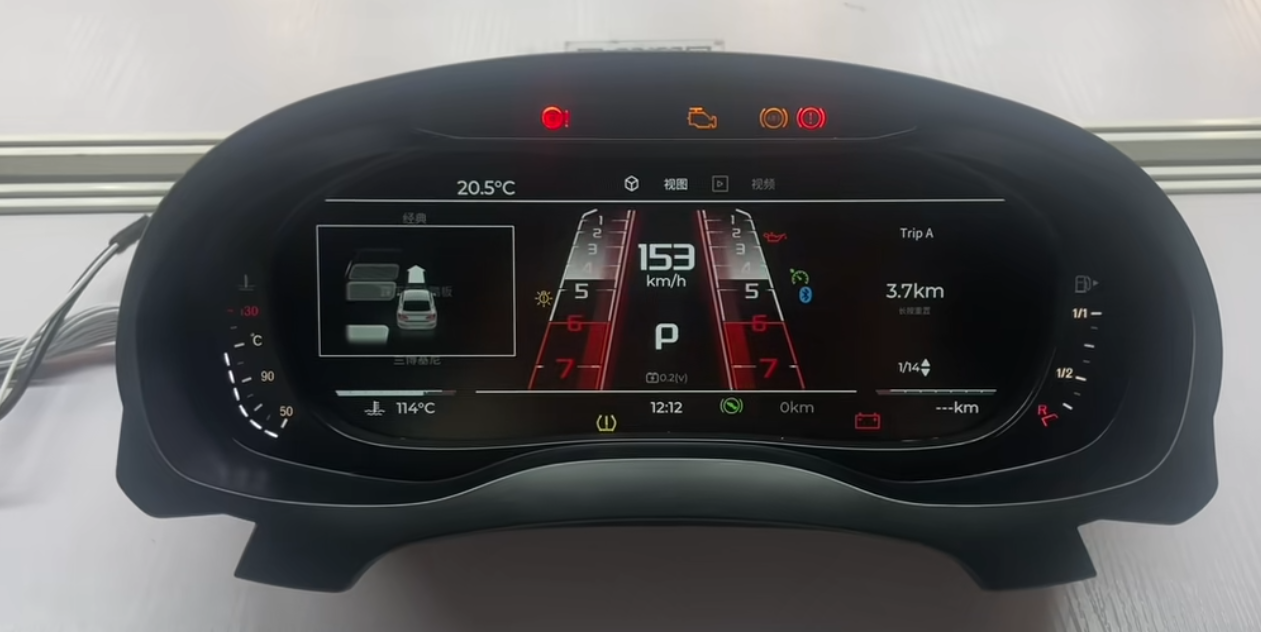
Sport-style LCD dashboard interface example.
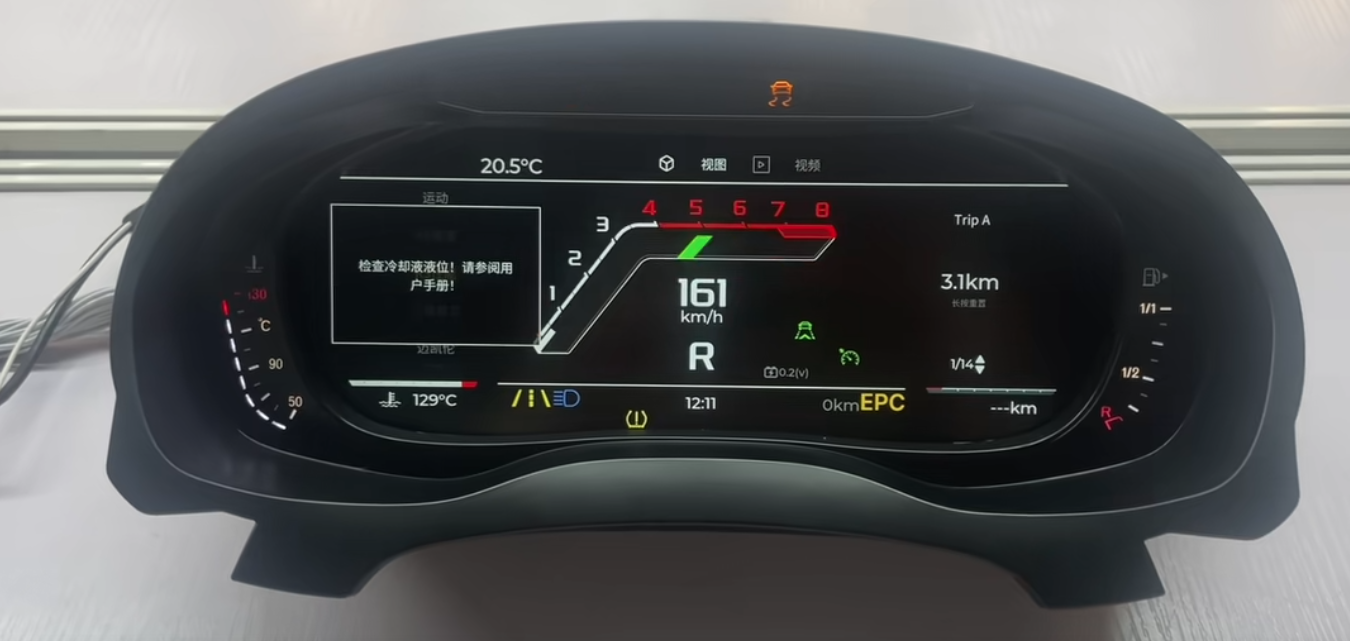
Factory-style digital dashboard interface example.
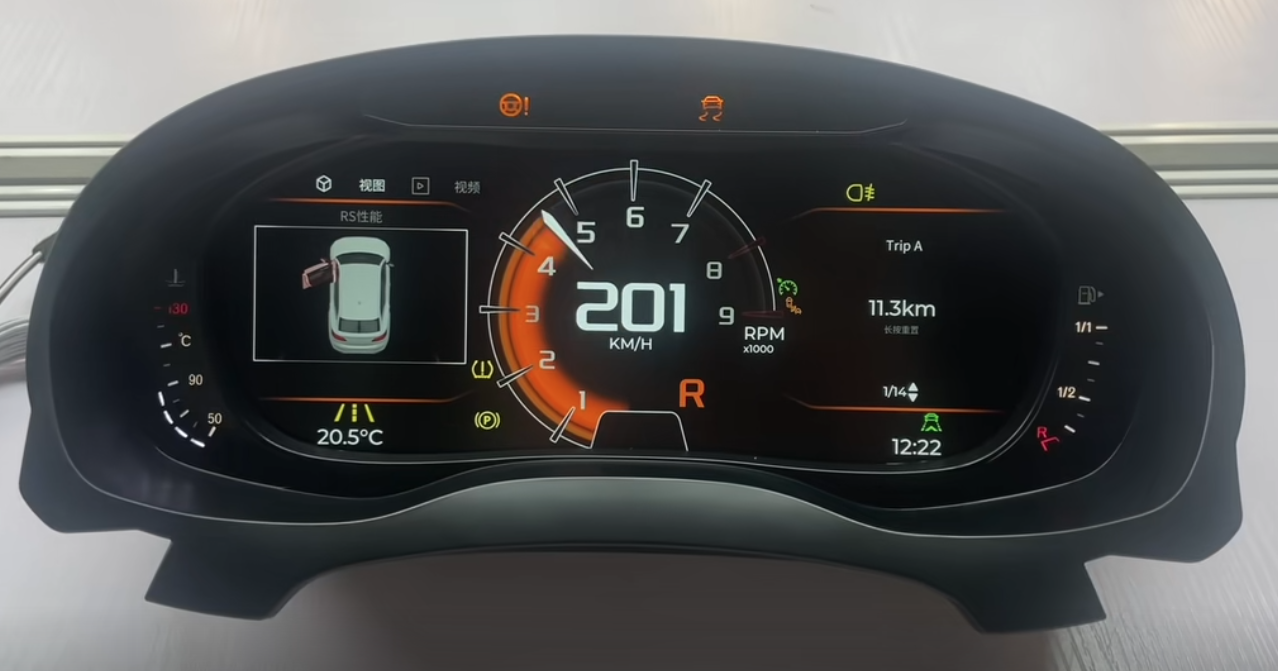
Alternative LCD dashboard interface example.
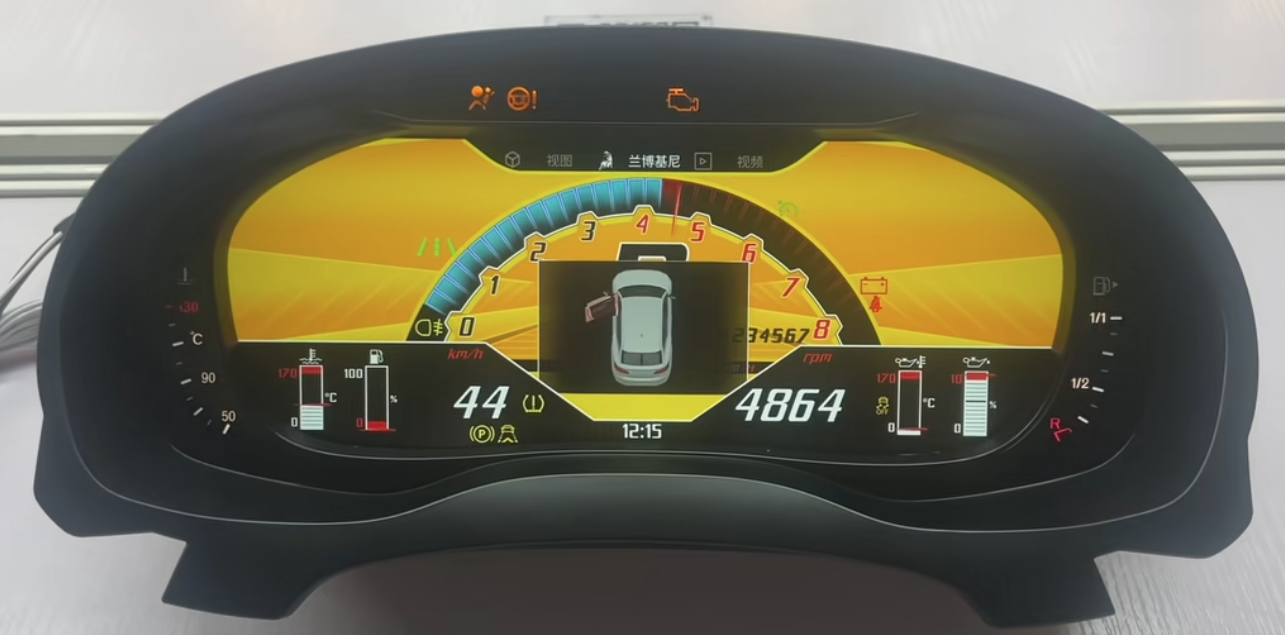
Performance-style digital dashboard interface example.
Installation and Integration Boundary
Volkswagen Digital Cluster Upgrade installation is vehicle-specific. Some supported routes use the original vehicle wiring connection without cutting or splicing the factory harness, but the installation process may still require dashboard disassembly, removal of the original cluster, original-part transfer, configuration work or final calibration checks.
What Plug-and-Play Can Mean
- The supported route uses the original vehicle wiring connection.
- The factory harness is not cut or spliced under the confirmed installation route.
- The selected unit is intended for a matching vehicle-specific configuration.
Vad Plug-and-Play Inte Betyder
- It does not mean every Volkswagen dashboard is compatible.
- It does not mean no dashboard removal or component transfer is required.
- It does not mean no setup, calibration or post-installation checks are needed.
- It does not automatically confirm CarPlay map display on the cluster.
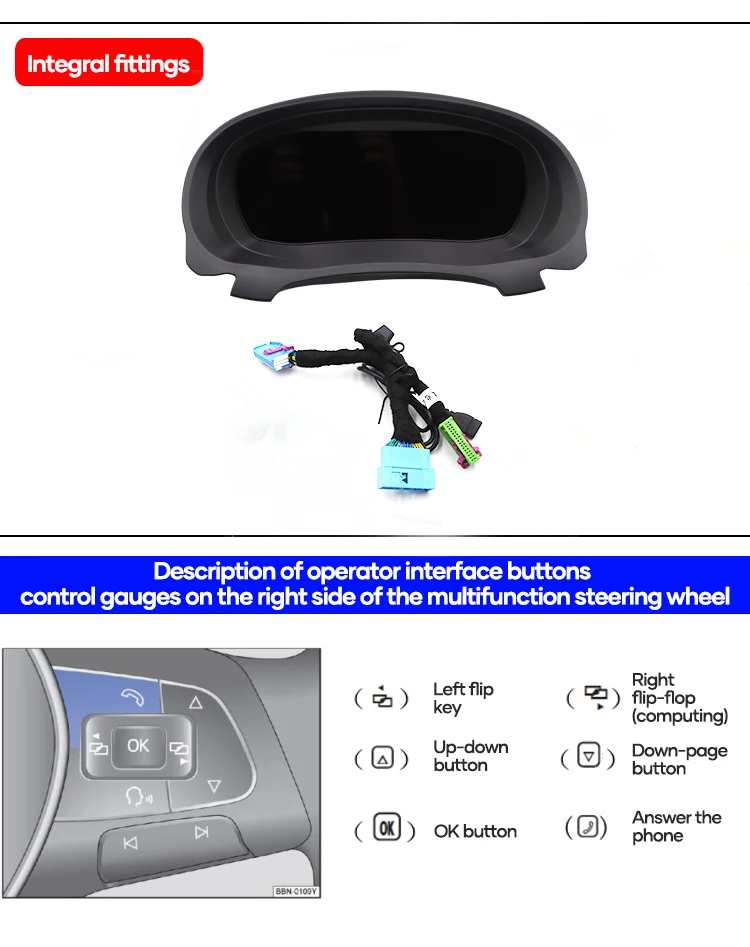
Steering-wheel control reference shown in the promotional material.
Functions to Check After Installation
- Stable screen startup and readable instrument display.
- Speed, RPM, fuel information and warning indicator behavior where supported.
- Steering-wheel menu operation where included in the selected route.
- Day/night brightness behavior and screen readability.
- CarPlay or navigation display only when the confirmed route supports it.
- Software-update access only through the correct supported system route.
Volkswagen Digital Cluster Upgrade Routes to Review
iKagoo offers Volkswagen digital instrument cluster products through model-specific routes. The examples below are browsing directions, not a universal compatibility claim.
| Volkswagen-väg | What the Buyer Should Review | Ordering Boundary |
|---|---|---|
| Passat Digital Cluster Routes | Original cluster layout, platform route, dashboard images and required functions. | Order only after matching the correct Passat-specific product route. |
| Golf Digital Cluster Routes | Vehicle generation, original analog or digital cluster baseline and connector details. | Do not assume all Golf generations use the same display unit. |
| Jetta Digital Cluster Routes | Model year, market version and original instrument panel reference. | Confirm the exact product listing before purchase. |
| Tiguan Digital Cluster Routes | Original dashboard configuration and vehicle-specific installation route. | Appearance alone is not enough to confirm fitment. |
| Polo and Other VW Routes | Product-page specifications, screen size, vehicle photos and required features. | Price and functionality may differ by product route. |
Browse the current Volkswagen Digital Cluster Upgrade collection to check available model-specific products, current prices and listed specifications: Volkswagen Digital Cluster Upgrade Collection.
CarPlay Display, Software Updates and Support Routes
Display routing and software support should be treated as separate technical decisions. A Volkswagen Digital Cluster Upgrade may provide advanced display options on a supported route, but those functions must be confirmed before ordering.
Volkswagen Digital Cluster Upgrade Collection
Browse model-specific Volkswagen digital instrument cluster products, listed features and current product-page pricing.
Browse Volkswagen Digital Cluster Upgrades →Digital Cluster Köpguide
Review the fitment evidence buyers should prepare before choosing any full LCD dashboard upgrade.
Read the Digital Cluster Guide →VW / Audi CarPlay Visningsvägledning
CarPlay connection does not automatically mean navigation maps will display in the instrument cluster.
Check the CarPlay Route →Online / USB Software Update Guide
Review supported update methods for compatible iKagoo Volkswagen and Audi digital cluster systems.
View the Update Guide →FixMyDash Software Support Service
Optional compatibility review and software-package support for eligible devices. This service does not guarantee repair of every hardware, wiring, communication or vehicle fault.
View Software Support →Vanliga frågor och svar
Is this page for one specific Volkswagen Digital Cluster Upgrade product?
No. This page introduces Volkswagen Digital Cluster Upgrade options and selected feature examples. Product specifications, fitment and pricing must be checked on the relevant model-specific product page.
Do all Volkswagen digital clusters use the same 12.3-inch specification?
No. The 12.3-inch specification shown here refers to a selected configuration used in the promotional material. Screen size and hardware specifications may vary by product route.
Can I choose a Volkswagen Digital Cluster Upgrade only by model name?
No. Buyers should confirm the year, original dashboard, instrument cluster layout, steering-side configuration and required functions before ordering.
Betyder Plug-and-Play att inget installationsarbete krävs?
No. On a supported route, plug-and-play means the factory wiring connection is used without cutting or splicing the original harness. Dashboard removal, component transfer, setup or final verification may still be required.
Will CarPlay maps automatically display on the instrument cluster?
No. Instrument-cluster map display depends on the confirmed CarPlay or projection route. Buyers who need this function should review the dedicated CarPlay display route guide first.
Why is there no fixed price displayed on this page?
Because this page covers multiple Volkswagen Digital Cluster Upgrade routes. Current pricing can differ by vehicle application, hardware configuration and availability. Use the collection or product page for the current listed price.
Does FixMyDash provide a guaranteed hardware repair warranty for these products?
No. FixMyDash is an optional software-upgrade and technical-support service route for supported devices. It does not guarantee repair of all hardware, wiring, communication, third-party modification or vehicle faults.
Choose the Right Volkswagen Digital Cluster Upgrade
Start with your exact Volkswagen model and original dashboard configuration. Then review the relevant iKagoo product page for current specifications, available functions, fitment requirements and current price before ordering.






4-kommentarer
Zsolt
Volkswagen t4 2002 évjarathoz is létezik ilyen műszerfal?
És mennyibe kerül?
王者
Please contact customer service and send a photo of your original vehicle’s instrument cluster. Customer service will then help you install a digital instrument cluster.
Fabio Arana
Can be Work for VW gol g3 2005
chenjin16316
ja